

Share This Article
This Servoy Tutorial is on how to create custom SVG CSS buttons and use them in your Servoy applications. If you are still using the standard Servoy buttons in your application (those Gray boring ones), then this article will help you take your Servoy application to the next level. Even if you have been using PNGs with labels in your Servoy apps as buttons, you may find this tutorial informative.

Every button needs an icon that further emphasizes the button action. The days of using colorful PNG icons all over your layouts is behind us; today’s design standards call for a cleaner and simpler user interface. Buttons should be consistent so they are easy to identify, and icons should be subtle, so as not to distract from the content. Just look to today’s mobile devices and their application design standards to understand what your interface should look like.
In recent years, as my apps needed to support more and more devices of varying resolutions, I have turned to SVG graphics. SVG stands for Scalable Vector Graphics, which means that a single vector graphic can be scaled to any resolution for any device (infinite scalability). PNG graphics, on the other hand, can be scaled in an image editor like Photoshop, but once you save your scaled image, they do not scale well to other resolutions. That means that if you use PNG graphics in your Servoy web app, and someone accesses it with a retina device, like an iPad, your application’s appearance will be degraded.
A good example of how important this has become can be seen with the Glyphicons, a popular set. If you want to use their 470 icons as PNG, you can do so for free. They come in 26×22 and will not scale well. You would have to open them in Photoshop, one at a time, and try to scale them to some usable size for Servoy, like 16×16. However, if you want the scalable SVG version of the icons (along with several other formats), it will cost you $59. Clearly, you need to use something other than PNG if you want your app to perform well across browsers, platforms and screen resolutions.
Okay, so with the preliminaries out of the way, let’s do a quick swing through some tools I use to work with graphics and buttons, and then work through a real example of how to build a better button in Servoy.
There are several places where you can get free SVG icons. One of my favorite collections can be found at Font Awesome. These are SVG icons that are sharp, scale well, and look great in any application. They also work great with CSS style sheets that you can use with your Servoy projects to create buttons with some extra flare.
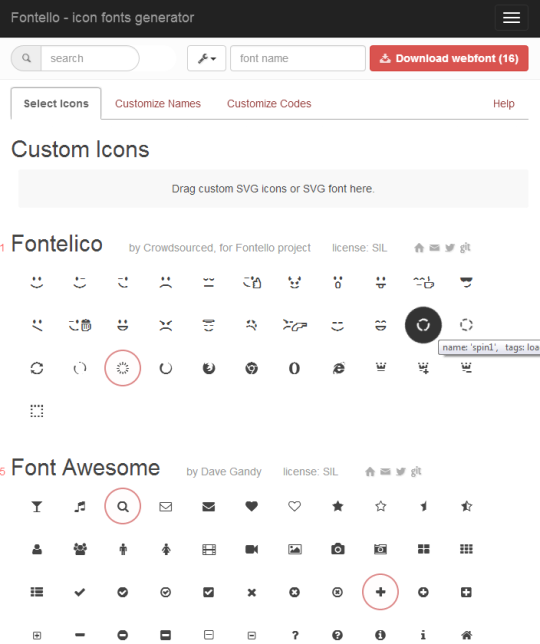
If you can’t find everything in one collection like Font Awesome, you can build a custom SVG collection using several free SVG icon sources at Fontello. The site allows you to choose from a large number of free icon sets, including most notably Font Awesome, Entypo and Typicons. You can select the icons you want to use in your project, then customize the names and codes if necessary, and then download your custom webfont collection that you can then use in your Servoy project.
Once you have your icons, you need to create a CSS button class that you will use to decorate your button. You could also create multiple CSS classes for different types of buttons, like one class for toolbar buttons, another for destructive actions like red for delete, etc. If you don’t know a lot about CSS, then you can create a custom CSS button class using the CSS Button Generator. It does a good job of building a CSS button class for you that you can then modify to suit your specific needs. It has a nice button preview, easy to use interface for tweaking your button class, and then a code snippet tab that gives you the complete CSS button class you created.

Once you have created your basic CSS button class using the Generator, you can copy the code into a new .css file (just a text file with .css extension) that you create at “servoy/application_server/server/webapps/root/”. You can then tweak the file using any text editor, but I like to use WebStorm for all my HTML and CSS work. I will often tweak things like the font family, font size, starting and ending colors for my button rollover effect, etc.

Now that I have my CSS button class, I am ready to build a button for use in my Servoy application. The first thing you need to do is to load the SVG fonts into Servoy as well as the custom CSS button class you created. You can do this at application startup using the WebClientUtils plugin. By doing this at application startup, you only need to load up the CSS once, and it can then be used from anywhere in your Servoy application. Shown below I am loading my SVG fonts and my custom CSS button class.
plugins.WebClientUtils.addCssReference('/resources/font-awesome-4.0.3/css/font-awesome.min.css');
plugins.WebClientUtils.addCssReference('/resources/gd.css');
The next step is to create a global for each of your icons, so you have only one place to maintain your icons for the entire application. In the code snippet below, I am doing simple HTML, specifying the CSS button class to use (“btnTealSquare”), the Font Awesome icon to use (“fa fa-plus fg-lg”), and the button label (“Add”).
/**
 * @type {String}
 */
var icon_add = '<html><a class="btnTealSquare" href="#">  <i class="fa fa-plus fa-lg"></i>  Add</a></html>';
When I need to use the Add button in my Servoy app, I can use a label for my button, and decorate it with my CSS button that I defined as a global var. Here is my label positioned on my form. You can attach any method to it just like a normal Servoy button (remember to deselect “showClick” and to select “displayTags”).
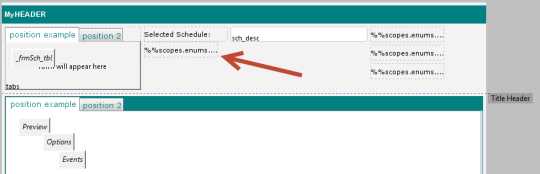
The next step is to set the Text property of the label to the global var I created for the Add button. In this case, my global var is in my scope called “scopes.enums”, but you could have that global in your base module if you are not using Servoy 7 and do not have access to “scopes” (In which case, you need to upgrade; scopes are essential and make life so much easier).

As you can see, the Text property of a label can be any valid HTML code (including variables that point to HTML) in addition to regular text; just make sure you select “displayTags”. This is what the Text property of my label looks like when I set it to my global var:
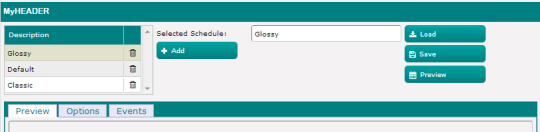
%%scopes.enums.icon_add%%And here is the button rendered in Web Client along with several others using the Font Awesome SVG icons and my custom CSS button class. Sorry, I had to scale the screen shot to fit on the blog page, so there is some loss in resolution here, but the app looks great, and scales great, on any device.
You can also color the SVG icon using a CSS class, or by simply using the style property like this:
/**
 * @type {String}
 */
var icon_shuffleGreen = '<html><a style="color:green" href="#"><i class="fa fa-arrows-v fa-lg"></i></a></html>';

/**
 * @type {String}
 */
var icon_shuffleGray = '<html><a style="color:gray" href="#"><i class="fa fa-arrows-v fa-lg"></i></a></html>';

/**
 * @type {String}
 */
var icon_shuffleRed = '<html><a style="color:red" href="#"><i class="fa fa-arrows-v fa-lg"></i></a></html>';
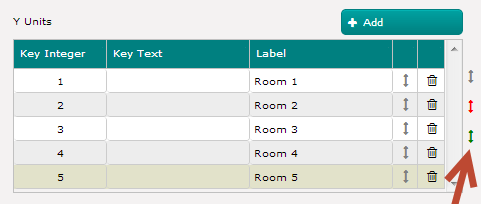
This is what these buttons look like on a Servoy layout. Here I am using the Gray icon for my shuffle technique (see my Servoy tutorial on Optimized Table Shuffle), but have placed the colored variations just to the right of the tab panel so you can see the rendered result.
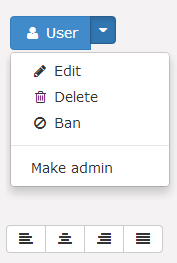
You can really build upon this basic concept and use CSS classes to spruce up your web app. For example, if you load up the Bootstrap CSS at startup, you can create global buttons that do more like reveal a drop down menu of options when the mouse clicks on them, or a complete toolbar of icons for some common functionality, like text alignment. Here are some sample Servoy global vars for more complex controls using the Twitter Bootstrap CSS style sheet (but any CSS can be used).
/**
 * @type {String}
 */
var icon_userAdminPanel = '<html><body> \
			<div class="btn-group open"> \
			<a class="btn btn-primary" href="#"><i class="fa fa-user fa-fw"></i> User</a> \
			<a class="btn btn-primary dropdown-toggle" data-toggle="dropdown" href="#"> \
			<span class="fa fa-caret-down"></span></a> \
			<ul class="dropdown-menu"> \
			  <li><a href="#"><i class="fa fa-pencil fa-fw"></i> Edit</a></li> \
			  <li><a href="#"><i class="fa fa-trash-o fa-fw"></i> Delete</a></li> \
			  <li><a href="#"><i class="fa fa-ban fa-fw"></i> Ban</a></li> \
			  <li class="divider"></li> \
			  <li><a href="#"><i class="i"></i> Make admin</a></li> \
			</ul> \
			</div> \
			</body></html> '

/**
 * @type {String}
 */
var icon_textEditToolbar = '<html><body> \
			<div class="btn-group"> \
			<a class="btn btn-default" href="#"><i class="fa fa-align-left"></i></a>  \
			<a class="btn btn-default" href="#"><i class="fa fa-align-center"></i></a> \
			<a class="btn btn-default" href="#"><i class="fa fa-align-right"></i></a> \
			<a class="btn btn-default" href="#"><i class="fa fa-align-justify"></i></a> \
			</div> \
			</body></html> '
And here is what it looks like rendered on the Servoy form. Note that I am using small HTML areas as the buttons in these cases, and that I have removed the onClick events which will fire the call to the global event handler and trigger specific methods hooked up to each option in the global control (see the Servoy Tutorial Event Driven Architecture for a complete discussion on how to do this).
So, that concludes this Servoy tutorial on button magic. It was really more than just about buttons; its about learning how to use the power of CSS style sheets with your Servoy solutions to take them to the next level. As you make your journey towards building more web apps, and building apps that will work well on mobile devices, understanding how to leverage CSS style sheets with your Servoy solutions will help you stand out from the crowd. I hope you found this Servoy tutorial informative and I look forward to bringing you more Servoy tutorials in the near future.

7 Comments
Gordon McLean
This may be a super obvious question Gary but it there a way to show these css buttons as clicked ie get Servoy to change the button state to active or similar ?
Gary Dotzlaw
It’s actually not as easy as you would think. I have done this using JQuery and CSS, but it takes some work (you decide if it is worth it; I stay away from it). You do it like this:
1. Create your three CSS classes for the various button states
button{
//your css
}
.button:active
{
//your css
}
.button:hover
{
//your css
}
2. Use JQuery to change the class (example shown only makes it active, so you need to modify to check for class and set active/normal), or use JQuery to locate your button by name and change the class (you might do this in the fireEvent handler of the button):
$(document).ready(function(){$('.button').click(function(){
$(this).toggleClass('active');
});
});
Read Docs http://api.jquery.com/toggleClass/
Gordon McLean
Thanks Gary, I suspect there would also be some mileage in looking at AngularJS for a similar solution that may be easier to implement. I think your right about the is it worth it question; perhaps not .. !!
Gary Dotzlaw
Yes, I think for normal buttons, just a hover state is all that is needed; skip the “active” state to indicate the button has been pressed. Setting a normal button to a state that indicates it has been pressed, later causes problems because you have to again reset it at some point. This type of on/off behavior is better suited to radio-buttons, which can be made to look really nice with CSS (like actual on/off toggle switches) instead of the basic Servoy radios.
James Doonan
Hi Gary,
Your tutorials are great, thanks for the time and effort you put in. It helps me a lot.Quick question if you have the time to answer:
I am using the following code to set the state of a selected button:
forms.frm_main.elements[‘btn_’ + globals.g_globals_section].border = ‘SpecialMatteBorder,0,0,5,1,#3c9be9,#3c9be9,#3c9be9,#e0e0e0,2.0,’;
Can I use similar code to set the state of the button on mouse rollover? I have tried several different approaches but none of them are working for me?
Thanks
Gary Dotzlaw
Hi James,
Thanks for the feedback on the tutorials. I wish I had time to write again.
Sorry to say, I have never tried what you are asking, so I have no suggestions.
James Doonan
No problem,
Thank you for the reply.